Viv overview
Introduction
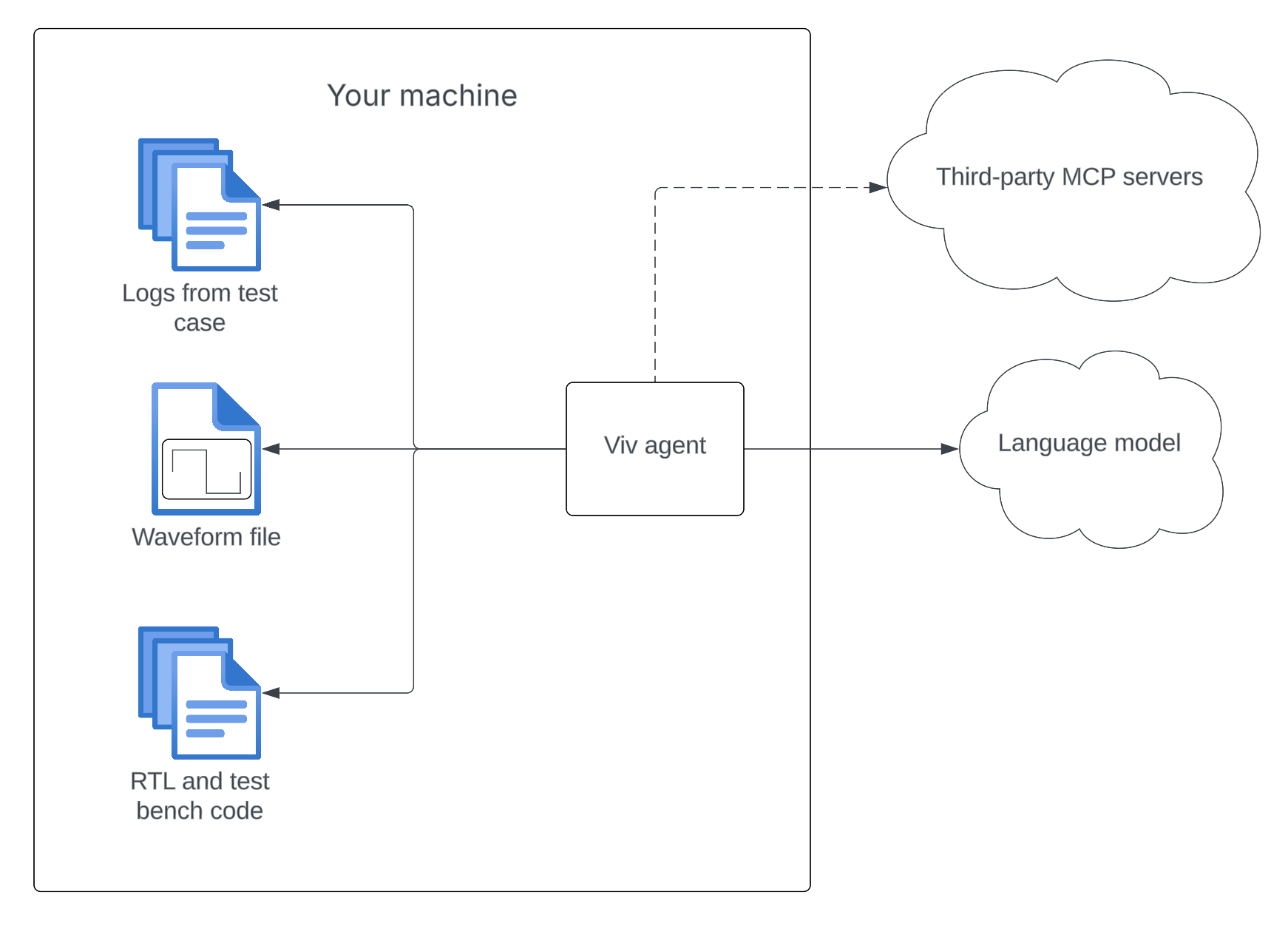
Viv is an AI agent for digital verification. Starting from a failing test case, Viv uses code, logs, waveform files, and specifications in order to find the root cause of the bug.
This diagram shows a simplified overview of how Viv works.
Why Viv
- Fast setup: Viv is a single Node.js package — install it in seconds with
curl -fsSL install.silogy.io | bashand start debugging immediately. - Simple interface: Run
viv submitfrom the command line with your code and logs. No complex configuration or infrastructure required. An optional VS Code extension is available for an integrated UI experience. - Minutes to root cause: Viv autonomously analyzes code, logs, waveforms, and specs to identify the root cause of a failing test case and produce a detailed bug report — typically in minutes.
- Efficient waveform analysis: Viv can analyze multi-gigabyte waveform files, querying signal behavior directly so you don't have to manually inspect waveforms.
- Secure and on-premise: Viv runs entirely within your infrastructure — no design data ever leaves your data centers.
- Works with your LLM provider: Bring your own API key for OpenAI, Claude, Llama, or any vLLM-compatible endpoint.
Frequently asked questions
Does any data leave my data center? No. Viv runs entirely on-premise. Your code, logs, waveforms, and specifications stay within your infrastructure. The only external communication is with the LLM API provider you configure.
What waveform formats does Viv support? Viv supports FST, VCD, and FSDB waveform files.
What LLM providers can I use? Viv works with OpenAI, Claude (Anthropic), Llama, and any vLLM-compatible endpoint. You bring your own API key.
Can I use Viv in CI/CD pipelines? Yes. Viv automatically runs in headless mode when stdin is not a TTY, outputting a Markdown bug report to stdout.
Do I need the VS Code extension? No. Viv is fully functional as a command-line tool. The VS Code extension is optional and provides an integrated UI experience.
Get started with Viv
Prerequisites
The starting point for Viv is always a failing test case.
The user running Viv must be able to read the following:
-
Code sources: One or multiple directories containing the version of the code that was used in the test case (passed via
-c).As an alternative, you can pass Synopsys VCS-style filelists (
.ffiles) via-for-F. All filelists, including nested ones, and the files and directories they refer to must be readable by the user. Useviv debug-filelists -f <path>to verify that your filelists resolve correctly. -
The logs directory: All the logs, artifacts, etc for the failing test in a single directory or .tar.gz file.
Installation and setup
Detailed instructions for how to install and set up Viv are located in the setup docs.
Debug a failing test case
First, ensure that the proper version of the code is in place in your code directory (~/project in our example) and that you have a copy of the logs from your failing test case available.
Then run:
# Using code directories
viv submit \
  --code-directory <path to your code directory> \
  --code-directory <another directory containing code files> \
  --artifact-path <path to the logs directory> \
  --export-markdown <output path to which Markdown-formatted debug results will be saved>

# Using VCS-style filelists
viv submit \
  -f <path to filelist.f> \
  --artifact-path <path to the logs directory>
For a full list of flags and commands, see the CLI reference.
You can also debug a test case by running:
viv
Select Submit and follow the prompts to start debugging.
View results
Wait for Viv to finish debugging the test case. Once it's finished, you'll see the bug report, which explains the root cause of the failure. Press the left and right arrow keys to switch between the bug report and the sequence of steps that Viv took to debug the bug. Results are saved automatically — you can browse and resume past analyses using viv history.
Start chat
Once Viv has finished debugging the error, you can get more information about the fail via chat. Simply press Esc to start the chat. Pressing Esc again will end it. Ask a question to the chat and get an answer:
╭──────────────────────────────────────────────────────────────────────────────────────────────╮
│ > Can you create a Git patch that fixes the bug?                                             │
╰──────────────────────────────────────────────────────────────────────────────────────────────╯

Sure! Here's a Git patch that fixes the issue:


diff --git a/rtl/ibex_controller.sv b/rtl/ibex_controller.sv
index 72fff08e..5bde0507 100644
--- a/rtl/ibex_controller.sv
+++ b/rtl/ibex_controller.sv
@@ -587,7 +587,7 @@ module ibex_controller #(
           // stage ready_wb_i == 1 so the FSM will always go directly to FLUSH.

           if (ready_wb_i | wb_exception_o) begin
-            ctrl_fsm_ns = FLUSH;
+            ctrl_fsm_ns = SLEEP;
           end
         end
Run a parallel investigation
If you want Viv to explore multiple angles simultaneously, use viv swarm:
viv swarm \
  --artifact-path <path to the logs directory> \
  --code-directory <path to your code directory>
Viv will automatically generate 3–5 hypotheses about the failure (covering RTL bugs, testbench bugs, and spec ambiguity) and spawn one investigator agent per hypothesis. Each investigator runs independently, and a synthesizer then reads all their reports to produce a unified bug description. This is useful for complex failures where the root cause isn't obvious.
You can also provide a hint to steer one of the hypotheses:
viv swarm \
  --artifact-path ./logs \
  --code-directory ./rtl \
  --guidance "I suspect the FIFO pointer logic"
After the swarm finishes, you enter the same chat interface as viv submit, with access to all investigator findings.
Re-run analysis
After Viv finishes debugging, you can ask it to run a fresh analysis on the same artifact — for example, to investigate a different hypothesis. Type /analyze in the chat box, optionally followed by a hypothesis:
╭──────────────────────────────────────────────────────────────────────────────────────────────╮
│ > /analyze the issue might be in the write-back stage                                        │
╰──────────────────────────────────────────────────────────────────────────────────────────────╯
Viv will show a confirmation prompt listing the paths it will analyze. After you confirm, a fresh analysis runs and the conversation continues with the new findings. Summaries of all previous analyses in the session are passed to the new run so Viv avoids re-investigating the same ground.
Export to Markdown
To export Viv's debug output to Markdown for later inspection, run the slash command /export in the chat box:
╭──────────────────────────────────────────────────────────────────────────────────────────────╮
│ > /export /path/to/exported/bug.md                                                           │
╰──────────────────────────────────────────────────────────────────────────────────────────────╯
This will export a formatted bug report to the desired path.
VIV.md setup (optional)
If a file called VIV.md is present in the root of the working directory, Viv will use it as a guide to the repo and commonly found log files. This helps Viv guide its investigation and avoid wasting time figuring out how the codebase is structured. A very simple VIV.md might look like:
# VIV.md

This repo contains RTL and testbench for a flux capacitor control module.

## Code architecture overview

### Core components

** RTL (`path/to/rtl/`)**
- RTL code written in Verilog
- etc.

** Testbench (`path/to/tb`) **
- Testbenches written in cocotb
- etc.

## Commonly found log files

- **sim.log** is the stdout/stderr from the simulation.
- **core_trace.csv** is a trace of the instructions handled by the golden model.
- etc.
You can create a VIV.md by yourself if you like, but we recommend creating one automatically and refining it afterwards. To create a VIV.md, run viv and select 2. Generate VIV.md. This will create a markdown file describing the structure of your repo, which you can edit manually after it is created. The more detailed this file is, the more efficiently Viv will be able to debug failing test cases. For a complete guide to writing an effective VIV.md, see Writing a VIV.md.
MCP server setup (optional)
Viv supports adding third party data sources in the form of Model Context Protocol (MCP) servers. Currently, only the HTTP+SSE transport for MCP servers is supported, but we are working on supporting stdio and streamable HTTP as well. To connect a server, simply run viv mcp add <MCP server URL>. For example, the URL for the Atlassian MCP server is https://mcp.atlassian.com/v1/sse. You will need to consult each third party's documentation to find its MCP URL.
If the server requires OAuth, Viv will open a browser tab to ask for permission to access the resources.
You can list MCP servers using viv mcp list and remove a server using viv mcp remove <server ID>.
This functionality is also accessible by running viv, selecting "Manage MCP servers", and adding / inspecting / removing servers.
Uninstall
To uninstall Viv, just run npm uninstall -g @silogy/viv.